

The new LCD acrylic glass holder …
Here’re the reasons for the new acrylic glass display holder …
The 20×4 LC(D) display whether in blue/white or violet/green are exactly the best for each PC, where they can be used for a j-box (HiFi PC project), or you would like to use them with a normal PC.
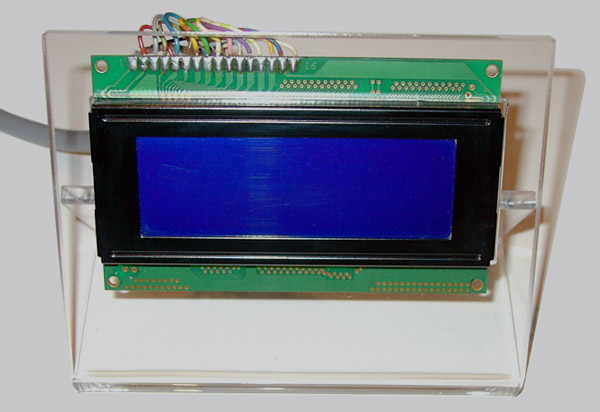
It is really unbelievable what LCD displays can show you with new LCD programs like e.g. JaLCD or Smartie – temperature, utilization of the CPU, memory usage, savegames, MP3 title, DVD title, also stock prices, weather forecasts, the current television program or similar representations is absolutely no more problem. But how useful are all these information, if you do not have the display at any time in the point of view? Not too much – and for this reason I worked myself on this acrylic glass holder, which is in a complete edition lasered and bended / warm-deformed. Up to the finished result it cost some trouble and time, but the result in my judgement is fantastically, beautifully and became absolutely practical. Besides I also resembled a black front plate as you wish like an Addon, which can be put between the LC display and the display holder Of course the plexiglass holder is not only suitable for the displays from the Fanshop, but also for all usual displays with a framework size of up to 98 x 40 mm! Now you can set this LC(D) display with the LCD holder directly beside the monitor and you have the desired information at any time in the view 🙂
The assembly …
In order to install the display you have push the rear holding device a little bit away, so that you have sufficient place, in order to plug in the display. After this the display is pressed without any screw connections, or something like this, through the rear holding device to the display holder front. As I don’t want somebody to press oder push at the acrylic glass, so I got an idea, we do this by wood wedges. Those are plugged in before connecting the display and the holder and they got removed after assemblying.
The following links are 2 guidances, one to install the display with the black front screen and the other guide explains how to install the display without the black front screen in the acrylic glass holder.
The assembly of the acrylic glass display holder without front screen …
The assembly of the acrylic glass display holder with black front screen …
And here is the Fanshop where you can buy all explained parts and displays !