

It’s very easy to increase the Vcore of the ASRock K7VT2 and the ASRock K7S8X mainboards by soldering just one resistor to the right point to allow your CPU much higher frequency. Of course it’s necessary to be very careful if you’re soldering something on your mainboard in order not to kill your board. And of course your warranty becomes void if you solder anything on your mainboard !
Therefore I recommend a good grounding and a soldering station with seperate grounding !
The ST L6917B is the voltage regulator of both ASRock mainboards (5 Bit Programmable Dual-Phase Controller). This voltage regulator have a FB pin (pin 9) for the voltage correction to allow manufacturers an optimal adaption of the Vcore and of course we can also use this pin to increase the vcore to “our correct Vcore” 🙂
In my test I used a normal 1/4 Watt resistor with 10 K. It’s also possible to solder a SMD resistor (103 = 10K) from pin 9 (FB) to Pin 7 (GND).
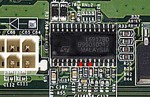
This picture show you the ST L6917B voltage regulator IC:
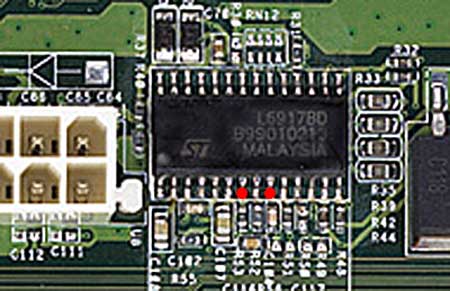
In the enlargement I’ve marked the two points where you have to solder the resistor to. The left point is Pin 7 (GND) and the right point is Pin 9 (FB), of course you can use another ground instead of Pin 7, for example the upper right hole, where you normally mount the mainboard to your case backside. You shouldn’t solder the resistor directly to the board in order to modify the resistance value later again. Just solder the resistor to a cable and then solder this cable to the marked pins.
After this modification you should check the correct position and check if there’s no tin at a wrong place !!!
Now put adhesive tape or a small piece of heat shrink sleeve over the resistor that it’s impossible to get a connection with the case or other components. After this small modification your Vcore should be about 0,25 Volt higher than you’ve selected in your bios.
That means if you select a Vcore of 1,5 V the real ! Vcore is 1,75 Volt and with a selection of 1,75 V you’ll get 2,00 V core voltage.
And you’ll get the highest Vcore of 2,10 Volt if you set the voltage in your BIOS to 1,85 Volt or close the L7/L11 bridge of your CPU.
And if that’s still not enough for your CPU you could solder a smaller resistance value to this place, but the risk to destroy the processor is much higher. Or use a variable resistor with 25 K, solder it to a 1 K resistor to prevent lower resistor values than 1 K and solder this to the two red points as shown in the picture above.
Pay attention to the CPU temperature after increasing the Vcore !!!
!