

BIOS …
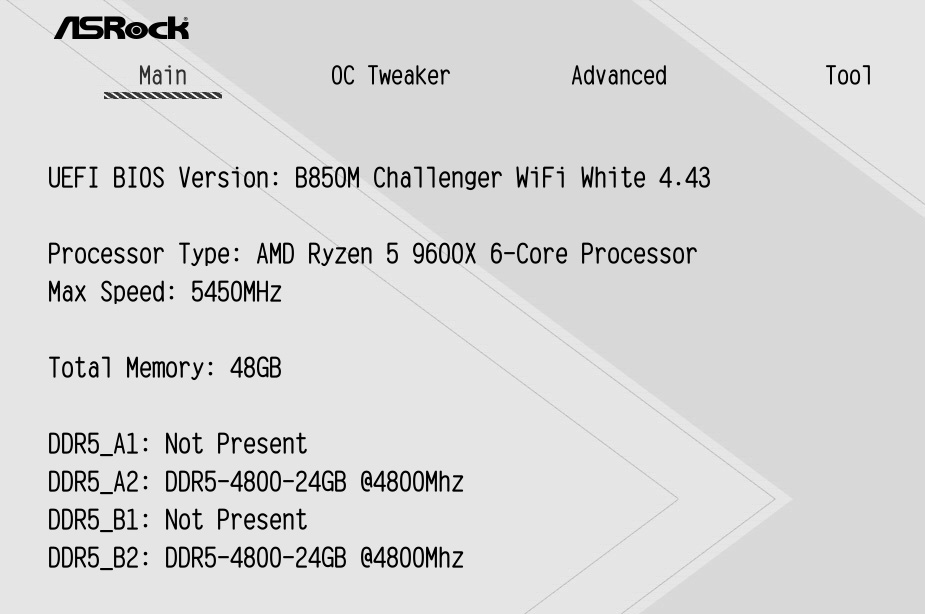
At the time of testing, the latest BIOS version, 4.43, had not yet been installed on our motherboard, so we updated the BIOS to the latest version before beginning the tests. Notably, the RAM was initialized at only 4800MT/s instead of the maximum allowed 5600MT/s, even though an EXPO kit with 6000MT/s and single-rank configuration was installed.
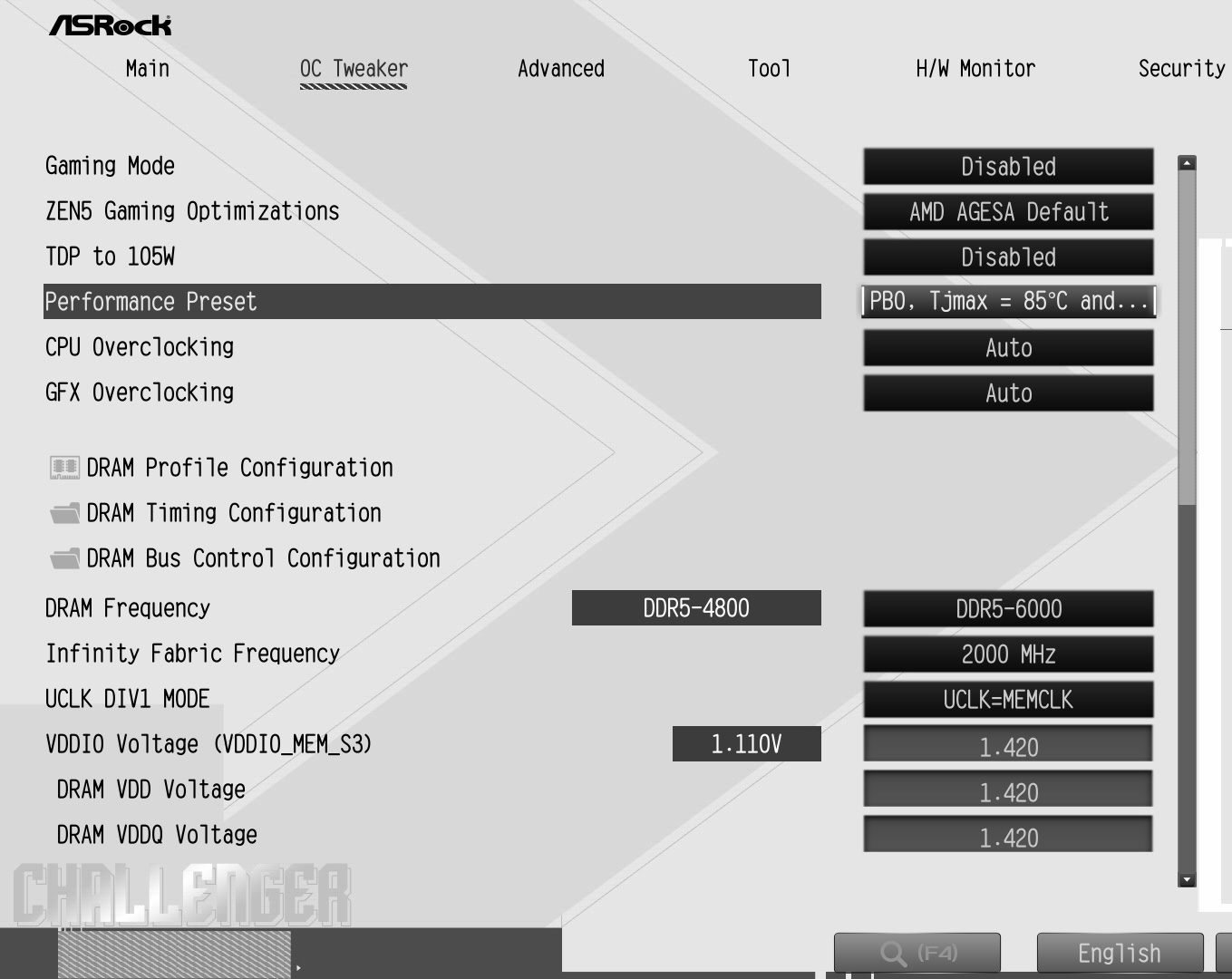
The OC Tweaker menu contains the most important settings for boosting system performance. First and foremost is the handy Performance Preset, which activates Precision Boost Overdrive while simultaneously reducing voltage. With a single click, you can also increase the CPU’s TDP from 65W to 105W, and for the RAM, you can load the fast EXPO profile-though we’d like to note here that EXPO settings may not always run stably and can lead to problems.
ASRock has included a search function on the B850M Challenger WiFi White, but this time around, ASRock has omitted the familiar Easy Mode, which displays the most important system data all on one page. Unfortunately, that’s not the only feature ASRock has left out of the B850M Challenger WiFi White. Unfortunately, the ability to manually adjust the Precision Boost Overdrive mechanism is also missing. As a result, no Boost Clock Override can be set, and the Curve Optimizer cannot be individually adjusted either. It’s unclear why ASRock deliberately removed these settings, especially since AMD generally makes them available for every B850 motherboard. Without the Curve Optimizer, the CPU unfortunately cannot be tuned for maximum efficiency-a concern for many users, since better efficiency reduces power consumption and minimizes system noise.
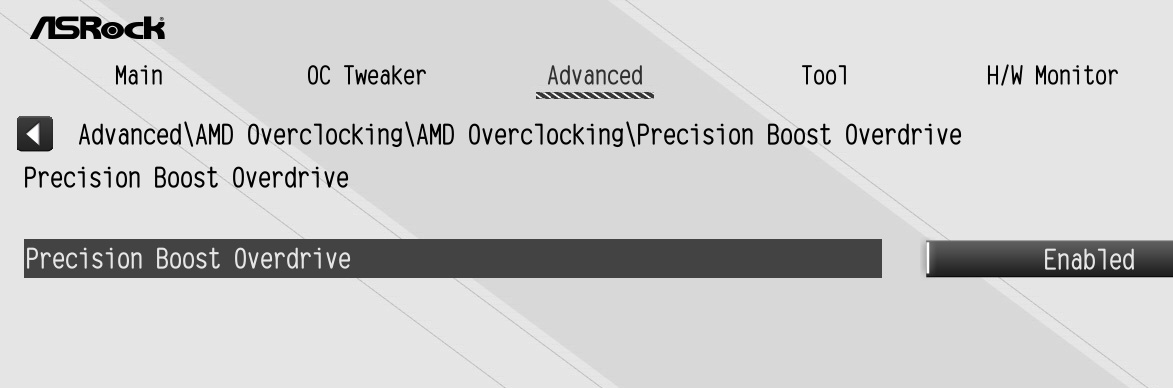
Aside from the simplified PBO menu, we didn’t notice any other missing features. The RAM can be fully tuned down to the smallest detail, and virtually everything else you’d expect from a modern PC can be configured as well.
Overclocking …
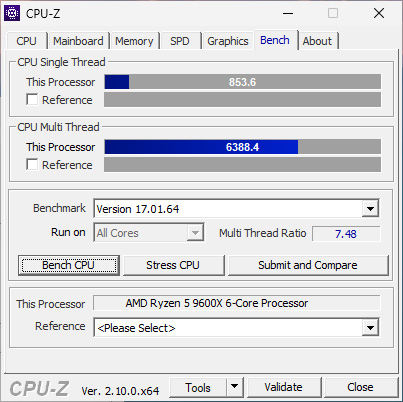
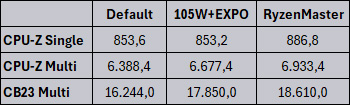
The BIOS defaults limit the installed Ryzen 5 9600X processor to a 65W TDP and a multicore clock speed of 3900MHz. In addition, the RAM runs at only 4800MT/s. While the system doesn’t consume much power in this configuration, it falls noticeably short of its potential performance. In the CPU-Z benchmark, it scores 853.6 points in single-threaded testing and 6388.4 points in multi-threaded testing. In the Cinebench R23 benchmark, it scores 16,244 points.
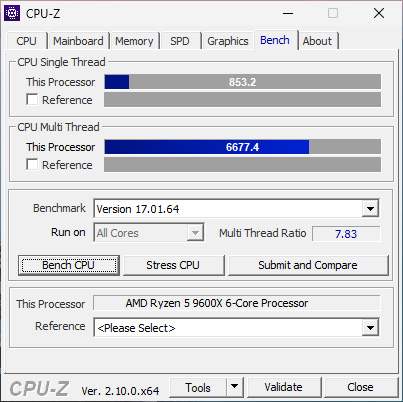
If you set the TDP to 105W in the BIOS and enable the EXPO RAM profile, the test system’s performance increases significantly under multi-core load. The CPU boosts to significantly higher speeds under multi-core load, and the RAM now runs at 6000MT/s with tighter timings, which is reflected in the following benchmarks. Due to the lack of a boost clock override, the score in the CPU-Z benchmark’s single-threaded test remains virtually the same as before at 853.2 points. The result in the multi-threaded benchmark, however, increases by 4.5% to 6,677.4 points. In Cinebench R23, the score even increases by approximately 10% to 17,850 points. Due to the CPU’s higher TDP and the faster RAM, power consumption naturally increases as well. The total power consumption rises from 123 watts to 195W.
However, the onboard tools pretty much reach their limit when it comes to overclocking. While there are performance presets, they don’t allow you to achieve optimal performance and efficiency. That’s why we installed the AMD Ryzen Master software on Windows to access the overclocking parameters hidden by ASRock. AMD Ryzen Master gives you full access to the entire Precision Boost Overdrive menu.
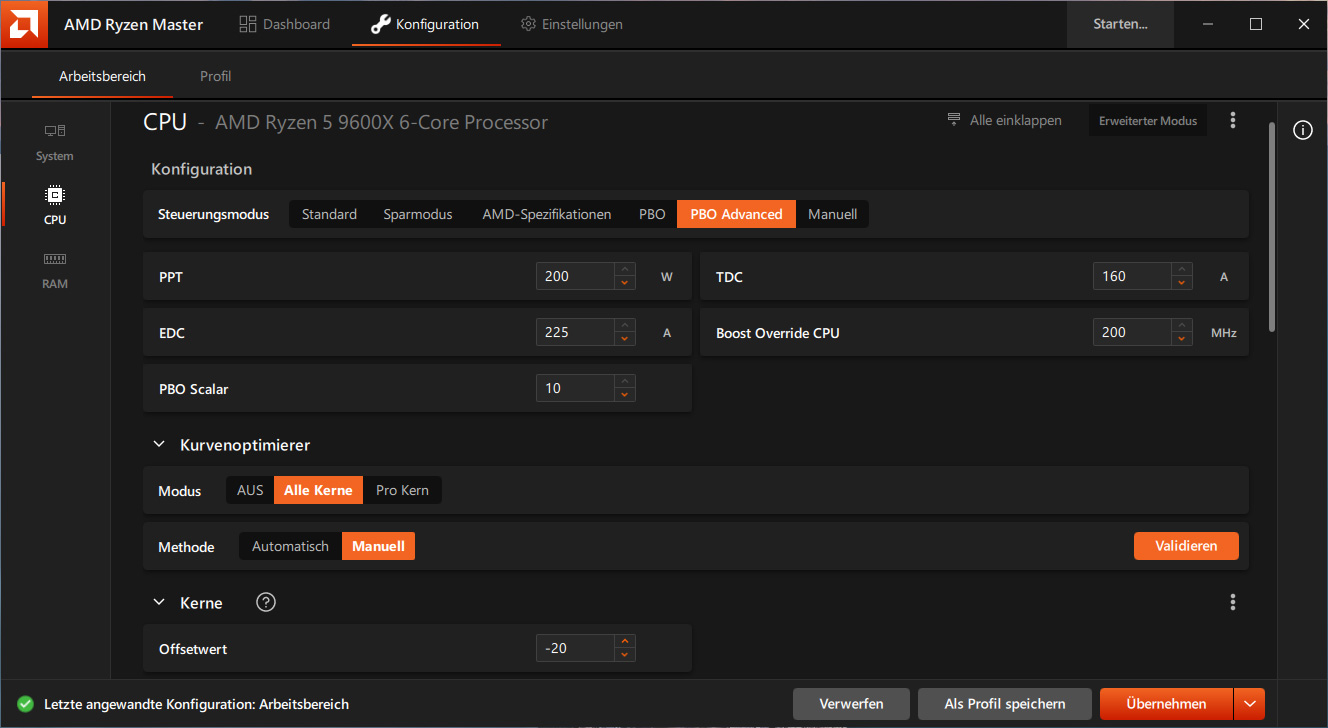
The Curve Optimizer can be adjusted for each core in individual steps, with each step corresponding to 5 mV.
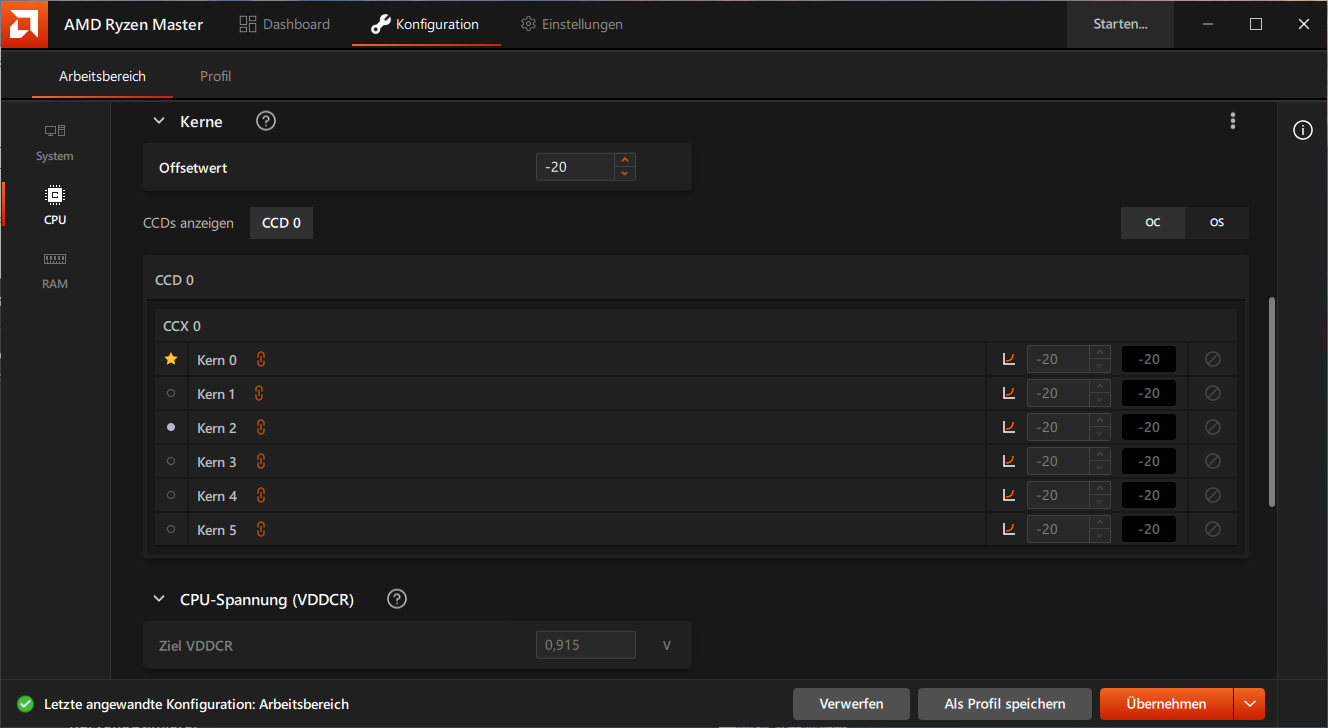
Even the comprehensive Curve Shaper, which allows you to adjust the tension for different frequency ranges and temperatures, is fully functional.
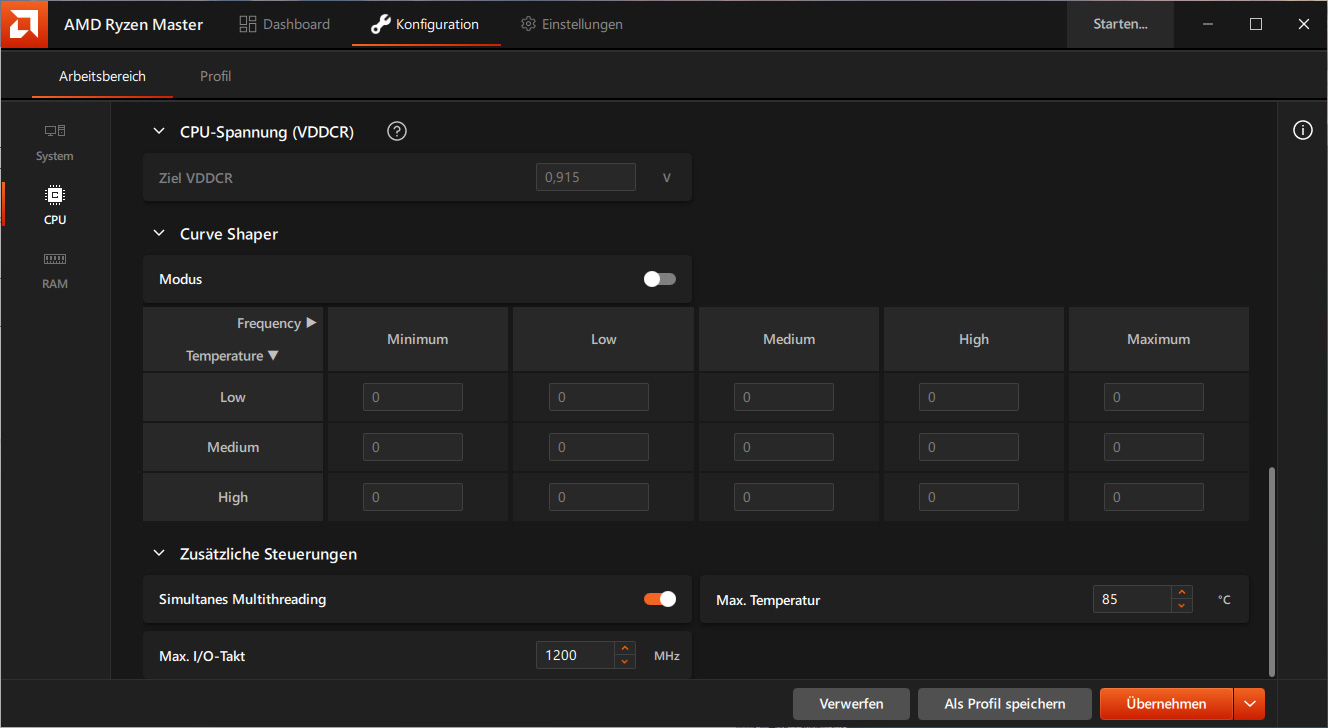
By simply increasing the boost clock override by 200 MHz and adjusting the Curve Optimizer, our test system ultimately achieved 886.8 points in single-threaded testing and 6,933.4 points in multi-threaded testing in the CPU-Z benchmark, representing increases of 3.9% and 3.8%, respectively. The score in Cinebench R23 rose by 4.3% to 18,610 points while power consumption remained constant. Unfortunately, it’s not enough to set the CPU parameters in Ryzen Master just once. To ensure that performance remains this high even after reboots, a comprehensively configured profile must be created with all performance settings and timings for the CPU and RAM, which is why using AMD Ryzen Master is recommended only for very experienced users. This makes it all the more frustrating that ASRock has largely removed the PBO menu from the BIOS, even though other entry-level motherboards with ASRock’s B850 chipset feature the full PBO menu.
To summarize, here is an overview of the individual benchmark values.
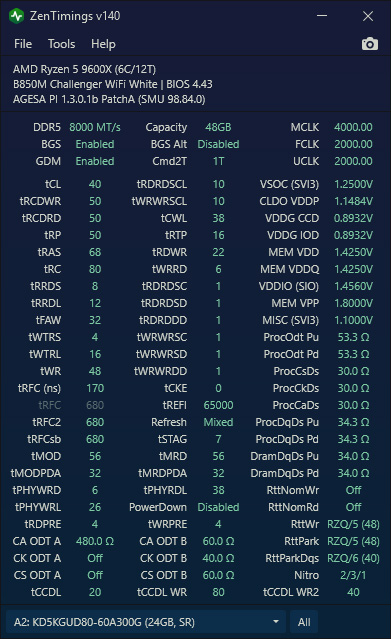
Finally, we tested the overclocking capabilities of the RAM on the B850M Challenger WiFi White. On the very first attempt, we were able to get DDR5-8000 running stably, and after just a few reboots, an optimized DDR5-8000 profile passed all the RAM stress tests we could find without any issues. Here are our DDR5-8000 settings.
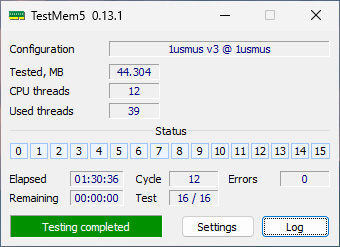
And here’s a screenshot of the successful completion of the challenging RAM test, TestMem5.
ASRock B850M Challenger WiFi energy consumption values …