|
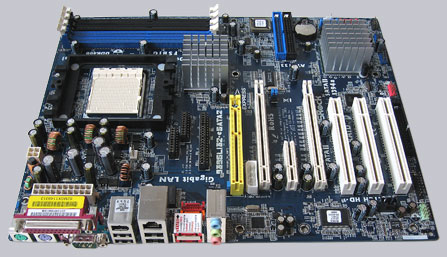
+++ The ASRock 939SLI32-eSATA2 motherboard
has a price of approx. 75 Euro (04/2006)
and is thus clearly below the so far tested PCIe SLI motherboards.
With the brandnew ULi M1695/ULi M1697 Socket 939 motherboard ASRock
shows again, that
first-class motherboards do not have to be expensive and can also
be suitable for overclocking.
We begin with the equipment, what this ASRock board has to offer.
As already mentioned in the recent PCIe SLI (2 PCIe graphics card
slots) reviews, most of the
SLI motherboards offers (as a result of the standardized ATX form
factor) only 2 PCI slots.
But ASRock managed it with the 939SLI32-eSATA2, despite the two
PCIe 16x slots for the
video cards, to place all the 3 PCI slots.
Additional to that this motherboard has a further PCIe 4x slot,
a power supply for graphics cards,
and a slot for the optional AMD AM2 CPU (940-pin) riser card.
Therefor the board layout is not quite optimal, but finally all
the connectors are adequate
accessible and the layout is absolutely practicable.
The area to be left clear around the CPU socket is about 40mm. This
is also enough place
for large CPU coolers.
On this picture you see the yellow ASRock AM2 CPU slot and the
two blank PCIe x16 slots,
which don't need a SLI Mode card. They will be accessed by software
only.
But of course it's necessary to connect both video cards with the
included SLI-bridge.

Furthermore the board can be equipped with altogether 4 memory
modules and is thus upgradeable
to maximally 4 GB memory.
The allocation for the DUAL Channel memory assembly is mentioned
in the user manual and
should be followed absolutely.
It's also possible to orientate oneself by the colors of the DDR-Slots.
Moreover the board offers 2x IDE connectors for up to 4x ATA 133
hard disks,
4x SATA-II ports (RAID 0/1) and 2x eSATA-II ports for external harddisks,
which have to be installed at two of the four internal SATA-II ports.
Included in delivery is a bootable CDROM and a short guidance for
the correct installation
of the Serial ATA-II ports. The guidance includes all informations
you need to manage a new
Microsoft Windows XP installation.
Here's a picture of the external Serial ATA-II outputs and the
internal Serial ATA-II inputs,
which have to be connected internal by using the eSATA-II connectors:

In addition the ASRock motherboard has 4x ATX panel USB 2.0 ports,
2 internal USB 2.0 plugs
for 4 other optional USB ports and an onboard 10/100/1000 LAN with
WoL (Wake on Lan).
As soundchip ASRock uses the 6-channel RealTek ALC-660 chip, which
is able to give support
for up to 6 sound channels with 3x 3.5mm connectors.
That isn't optimal for ambitious gamers, but finally enough for
most of the consumers who don't
need digital outputs.
By pressing the F2 key, you get access to the AMI BIOS.
Here're the strengths of the new ASRock 939SLI32-eSATA2 motherboard.
In the BIOS menu are e.g. options to change the memory frequency
from 133 MHz over 166 MHz
up to 200 MHz (divider 3:2/4:3/1:1).
The host clock is adjustable from 150 Mhz up to 400 MHz and the
HT (hypertransport) frequency
from 1x to 5x (200/400/600/800/1000 MHz) beside extensive memory
timing.
The optional synchronous or asynchronous setting of the CPU/PCIe
Bus with a fix PCI clock
(33.33 to 37.5MHz is a very helpful feature for good overclocking
results.
In the overclocking test it was possible to reach a stable host
clock of awesome 300 MHz
with the default passive cooled chipset.
This is a nice result for an ULi Chipset instead of the usual ~
270 MHz and this test result
was achieved with default chipset voltage.
By increasing the chipset voltage this result could be surely improved.
The BIOS setup offers memory voltage (VCCM) and the CPU voltage
(VCore) settings,
where you can rise the CPU voltage using the new
socket 939 pinmod guide.
Most monitoring values like the CPU temperature, chipset temperature
and fan rotation speeds
are shown in the BIOS, but it would be nice to have in addition
all voltages and the useful
"CPU overheat Shutdown" option.
According to the manual the CPU is protected against too high temperatures,
but in the current
BIOS version are no settings to adjust this shutdown temperature.
Result: The very inexpensive ASRock 939SLI32-eSATA2 Socket 939
PCIe SLI motherboard
offers among great overclocking results a well basic equipment,
lot of upgrade options and
a very good performance.
In view of the very favourable price the new ASRock motherboard
is again unique on the market
and offers except of the somewhat poor onBoard sound chip awesome
features.
In addition the clearly improved overclocking options and results
are a neat surprise !
All in all the company ASRock was able to get again the Redaktion
ocinside.de
Overclocking Price Tip Award (04/2006) for this AMD Socket 939 motherboard,
because ASRock
shows us once again that we're able to get more for little money
!
Update of the Review:
An AMD Socket AM2 CPU in an AMD Socket 939 Motherboard won't work
?
It works ;-)
As already mentioned in the top of the test, the 939SLI32-eSATA2
Motherboard offers beside
the AMD 939 pin CPU socket also a so-called ASRock Future CPU Port
(yellow slot).
Of course this option shouldn't remain untested, because who already
own this Motherboard
and would like to buy now one of the inexpensive AMD AM2 CPUs,
can upgrade the board for Socket AM2 within a few minutes!
You just need the so-called AM2CPU board from ASRock and of course
the suitable 240-Pin
DDR II memory modules, which are set directly on this board.
The CPU EZ Upgrade board is currently available for approx. 29 euro
(10/2006) and
is delivered in this small box:

The box includes the AM2CPU Upgrade board and a manual.
The installation is also explained in the manual of the respective
ASRock Motherboard and should
be carefully noted, because there're some Jumpers to be changed
for the AM2 Future Port.

Here's a picture of the back, with the large unscrewable metal
plate of the AM2 Socket.

And in such a way the board looks installed.
Install the CPU, the CPU heatsink, the desired DDR-II memory modules,
change the Jumper rows
on the Motherboard and push the Upgrade board in the ASRock Future
CPU Port.
According to the manual one should remove the Socket 939 heatsink
mounting plate,
which wasn't necessary with the small OEM cooler of the AMD box
CPU.
The Socket AM2 Upgrade board has by the way its own power connection
for the CPU fan and
also the additional 12 V power supply plug (4-Pin plug).

A small deficiency became clear however only with the installation.
Because hardly video card manufacturer thought about the fact that
one could install another card
above the PCIe Slot.
So it may be that the GPU heatsink already hit the Upgrade card.
Therefore before the purchase of the Upgrade board it's recommendable
to look at the used
graphics card, if there's a bigger heatsink in diametrical opposition
to the PCI Slots.

After the successful installation, the PC starts now with the new
AMD Socket AM2 CPU and in
the BIOS is the quite unusual screen with the 940 pin CPU in the
939 pin Motherboard.
Additionally also the DDRII memory is now shown in the BIOS screen.
BTW. it's recommended to download the latest BIOS version immediately,
because otherwise "funny" CPU values may appear - e.g.
AMD Athlon 64 FX CPU.
This is however rather an optical blemish, because the CPU IDs are
not implemented in older
BIOS versions.

But not only the BIOS post is unusual, also the test results.
Because the Motherboard is still very well overclockable and is
able to overclock the new AMD
AM2 processor and the DDRII memory up to the limit.
In the test I've overclocked for example an inexpensive AMD Athlon
64 3000+ AM2 CPU from
1800 MHz to sayful 2640 MHz !
The operating system detects the new CPU well and got no errors.
Of course the benchmark difference of the AMD Athlon 64 3000+ Socket
939 CPU compared to the Socket AM2 CPU is also very interesting.
Because a comparison of both CPUs on an identical Motherboard is
quite rare.
Both processors are running with 1800 MHz on 3D Mark 2003.
As expected, the AM2 variant got a higher result with the faster
memory and reached
8075 3D Mark 03 points instead of the 7916 points with the Socket
939 CPU.
Review Result 2:
(ASRock 939SLI32-eSATA2 PCIe SLI Mainboard with AM2CPU Upgrade Board)
The excellent ASRock 939SLI32-eSATA2 SLI Mainboard convinces in
the test also with that
additionally available Socket AM2 Upgrade board.
The benchmark results, the stability and even the overclock results
are consistently positive and
offers the latest Socket AM2 technology for the "old"
?! Socket 939 system.
Who like to upgrade an ASRock Socket 939 Motherboard with Future
CPU Port to a
Socket AM2 System got a nice and reasonable solution with this AM2CPU
Upgrade board.
Of course it depends on the price if this also make sense for a
new AM2 motherboard purchase.
Special thanks to ASRock
for their support.
|